

See which decision paths run most often, refine your rules directly and bring your logic to life through an interactive interface.
In Leapter, a Blueprint brings together visual diagrams and the text describing your business logic. It gives your team a way to understand the rules behind a decision and work directly on them.
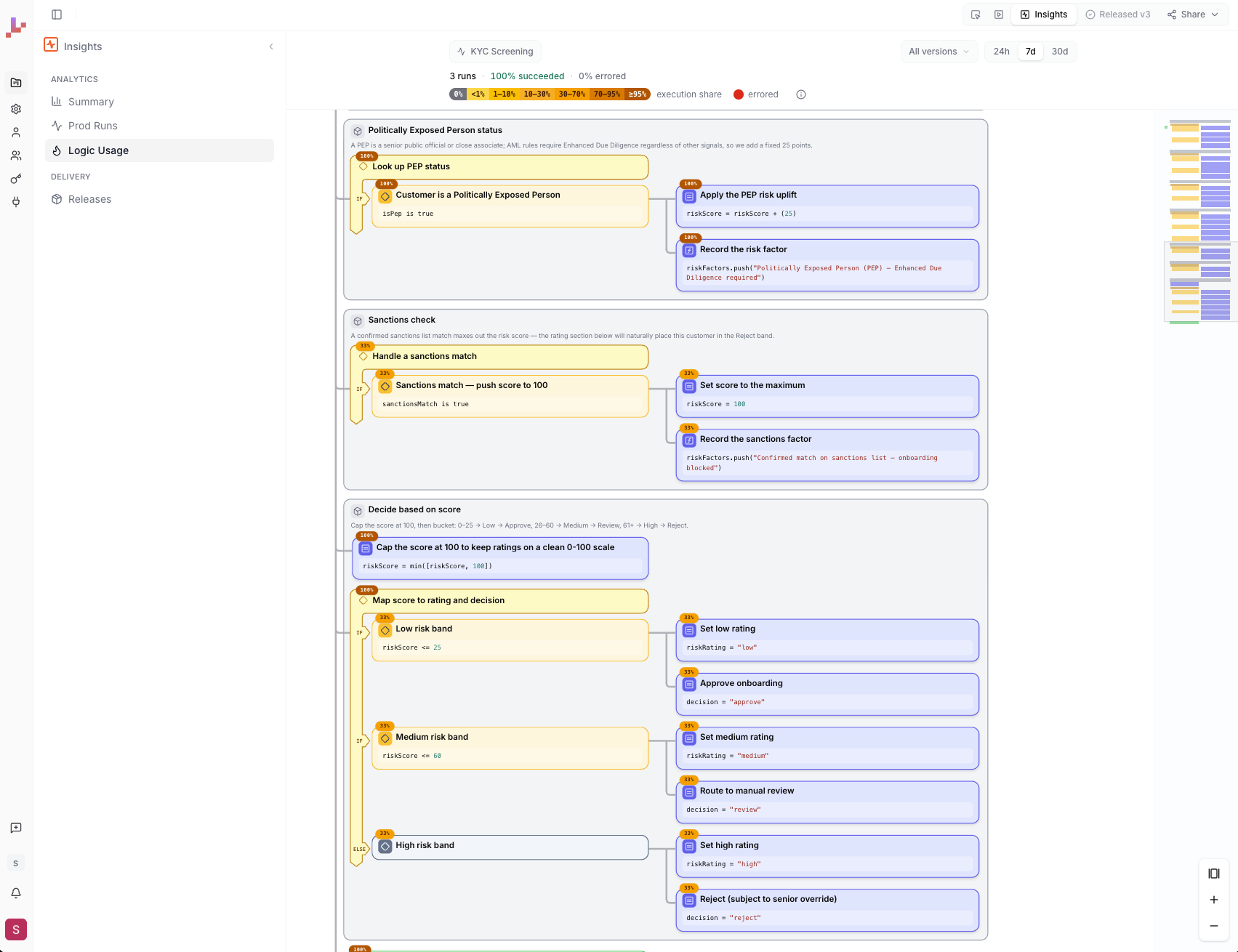
Our latest update introduces three features that make this easier: a Heatmap showing decision-path usage, flexible Blueprint views and a Playground for building a user interface around your logic.
See Leapter in action: Watch the demo.
Heatmap: see which decision paths run most often
Understanding your logic is one thing. Seeing how often each path is triggered adds another perspective.
The new Heatmap shows exactly how often each decision path has been used. Frequently triggered paths and less-used branches become visible, giving your team a concrete starting point for rule reviews and improvement efforts.
In a credit-approval Blueprint, for example, you could compare how often the logic leads to approval, rejection or manual review. If a manual-review path is triggered frequently, your team can investigate the conditions behind it and check whether they still reflect the intended policy.
Instead of relying on assumptions about how your logic is used, you can bring observed usage into the conversation about what to review next.
Blueprint views: move between context and focused editing
Different tasks call for different levels of detail. Reviewing the reasoning behind a policy is not the same as adjusting a specific condition.
The detailed view presents the full Blueprint, combining visual diagrams with the text explaining the logic. A diagram-focused view lets you concentrate on an individual diagram. Domain experts can edit the logic directly in the view, helping reduce the back-and-forth between the people who own the rules and technical teams.
An underwriting expert, for example, can read the policy context, focus on the relevant eligibility conditions and edit them directly.
The explanation supports understanding. The diagram supports focused work.
Playground: bring your decision logic to life
A working example can make a discussion more concrete than a written requirement alone.
The new Playground lets you create a full user interface around your decision logic, so stakeholders can interact with an example rather than only discuss how it should work.
Build a loan-eligibility checker that evaluates applicant inputs, an insurance quote calculator that displays a calculated premium, or a warranty-eligibility tool that checks whether a claim meets your conditions.
Stakeholders can enter different inputs, inspect the results and explore scenarios relevant to their work. This helps your team gather more specific feedback and identify missing requirements before committing to a wider implementation.
The conversation moves from “Is this what we described?” to “Does this work for the cases we need to handle?”
Explore the update with your own use case
Start with an approval, a pricing rule or an eligibility check. See which paths run, refine the logic with your experts and bring it to life in the Playground.
Full breakdown of all Leapter features and capabilities can be found in the documentation.