

An illustrative insurance use case, bringing together executable policy rules, an interactive claims interface, and visibility into live decisions.
A policyholder reports storm damage to a building. The claims team needs to assess the incident against the insurance contract, examine the available weather evidence, and determine the appropriate outcome.
Behind that assessment sit several connected decisions: which conditions apply, whether the evidence meets the configured storm criterion, how costs should be treated, and whether the claim requires specialist review.
For the insurer, the challenge is keeping those decisions understandable and maintainable as policies and requirements evolve. This use case shows how Leapter brings the rules, the experience of testing them, and their operational behavior into view.
Turn policy knowledge into executable logic
The team starts with the conditions governing its storm-damage assessment. These include the relevant contract terms, weather-evidence requirements, calculation rules, and authorization limits.
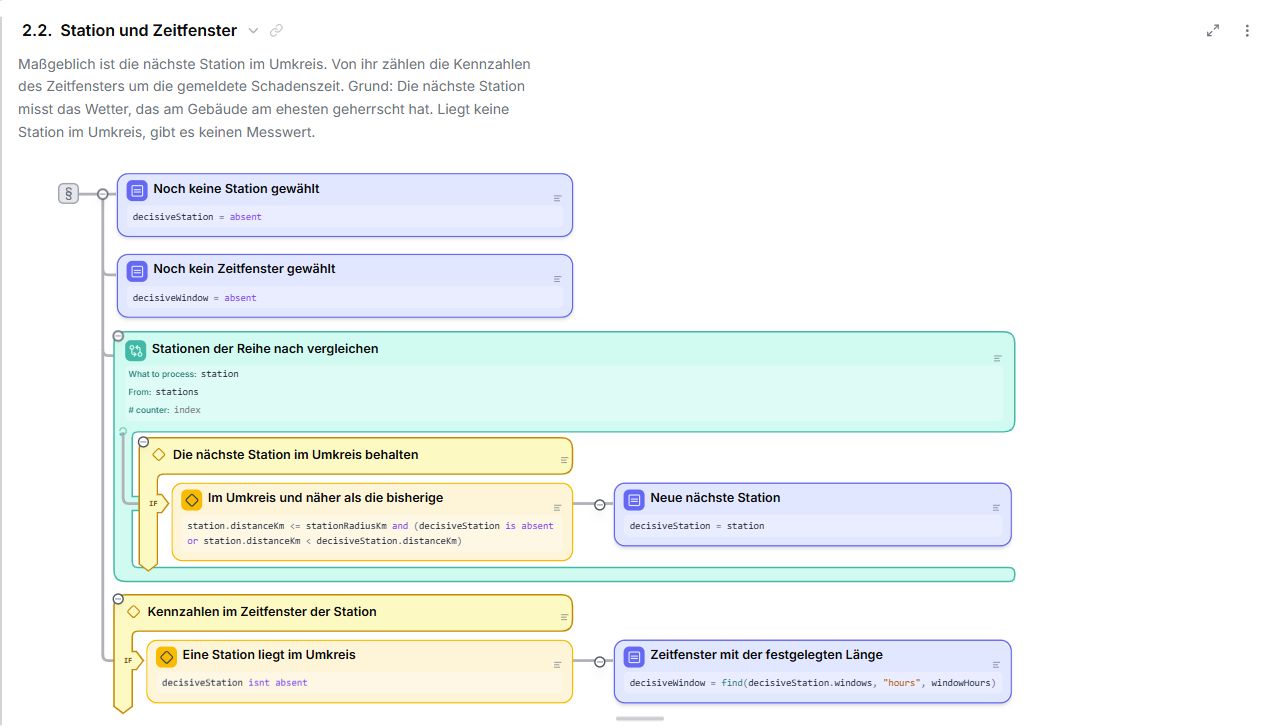
With Leapter, the team can use AI assistance to create and refine an executable Blueprint. Business descriptions sit alongside visual conditions, calculations, and decision branches. Claims experts can review the implementation in the context of the policy it is intended to apply.
For example, a section explaining the evidence required to establish a storm can sit directly above the logic evaluating that evidence. The specialist can inspect the selected weather measurement, the threshold being applied, and the outcome when the condition is not met.
The generated Blueprint gives the team something concrete to examine. The claims expert checks its assumptions and behavior against the intended policy, then works with the agent or edits the logic directly to refine it.
Bring the assessment to life in the Playground
The next step is to experience the assessment as someone using it.
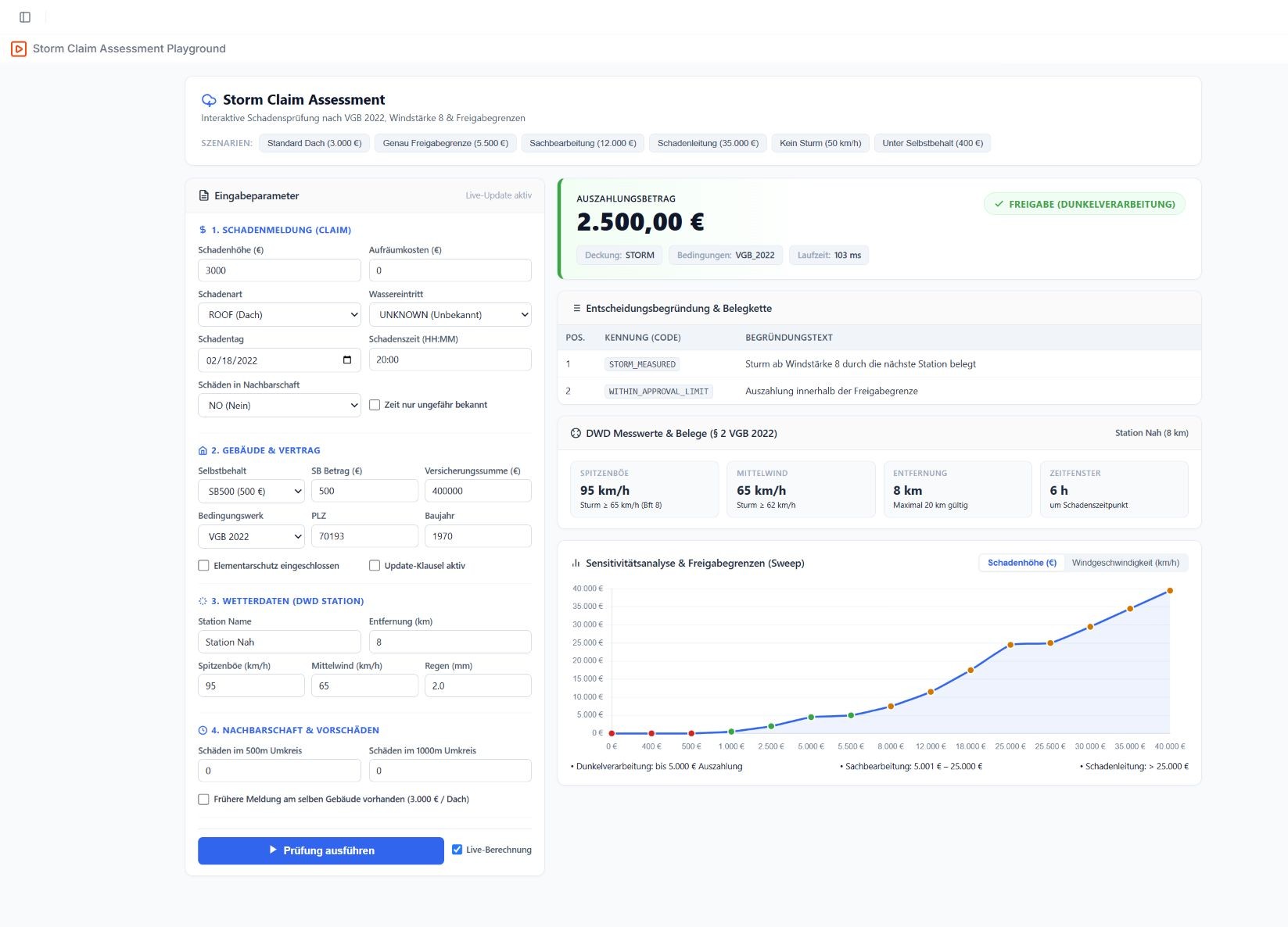
In the Leapter Playground, the team can ask the Lab Agent to create a user interface around the Blueprint. For this use case, that can take the form of a claims workbench with fields for incident details, weather evidence, estimated damage, and clean-up costs, alongside a display of the assessment result.
A specialist can enter a representative claim, run the assessment, and inspect the result. The Blueprint remains visible beside the interface, showing the path taken through the logic and the resulting outputs. The team can also ask the agent to adjust the interface, add example scenarios, or present results differently.
This gives claims experts and other stakeholders a practical way to test the assessment. They can change an input and observe its effect: stronger weather evidence, a different damage estimate, or costs approaching an authorization limit. The Playground uses the working version of the Blueprint, allowing the team to explore changes before release.
Investigate the reasoning behind an outcome
In the recorded demonstration, a claim receives a rejection result because the weather evidence does not satisfy the configured storm condition.
For the claims specialist, that result becomes the starting point for investigation. They can inspect the rule behind the assessment, understand its business purpose, and examine which values it evaluates.
The walkthrough highlights a useful example: average wind speed and peak gust speed are different measurements. A policy expert needs to verify that the implementation uses the measure required by the configured rule. Having the explanation and executable condition together makes that review more direct.
The team can then test relevant variations, including cases close to a threshold and situations requiring further review. Expected outcomes come from the intended policy. Tests and execution traces help establish whether the implementation behaves accordingly.
Use approved logic in the claims application
Once the team has reviewed and tested the rules, it can release an approved version for use by the insurer's claims application.
The application supplies the required inputs and calls the released Blueprint. Leapter evaluates the explicit logic and returns its outputs. Those outputs can support an assessment result, a calculated amount, an explanation, or a referral for human review, according to the rules the team has defined.
AI assists with building and refining the implementation. At runtime, the Blueprint executes deterministically: the same complete inputs and the same logic version produce the same result. The insurer determines which outcomes may be acted on automatically and which require a specialist's decision.
Follow live assessments with Leapter Insights
Release opens another stage of review: understanding how the assessment behaves with production data.
Leapter Insights gives the team visibility into production activity and execution performance. It also provides access to individual production runs, allowing a reviewer to inspect the inputs, outputs, and release associated with an assessment.
If a particular claim produces an unexpected outcome, the team can open its recorded execution trace and follow the path taken through the released logic. This connects the operational case with the implementation that evaluated it.
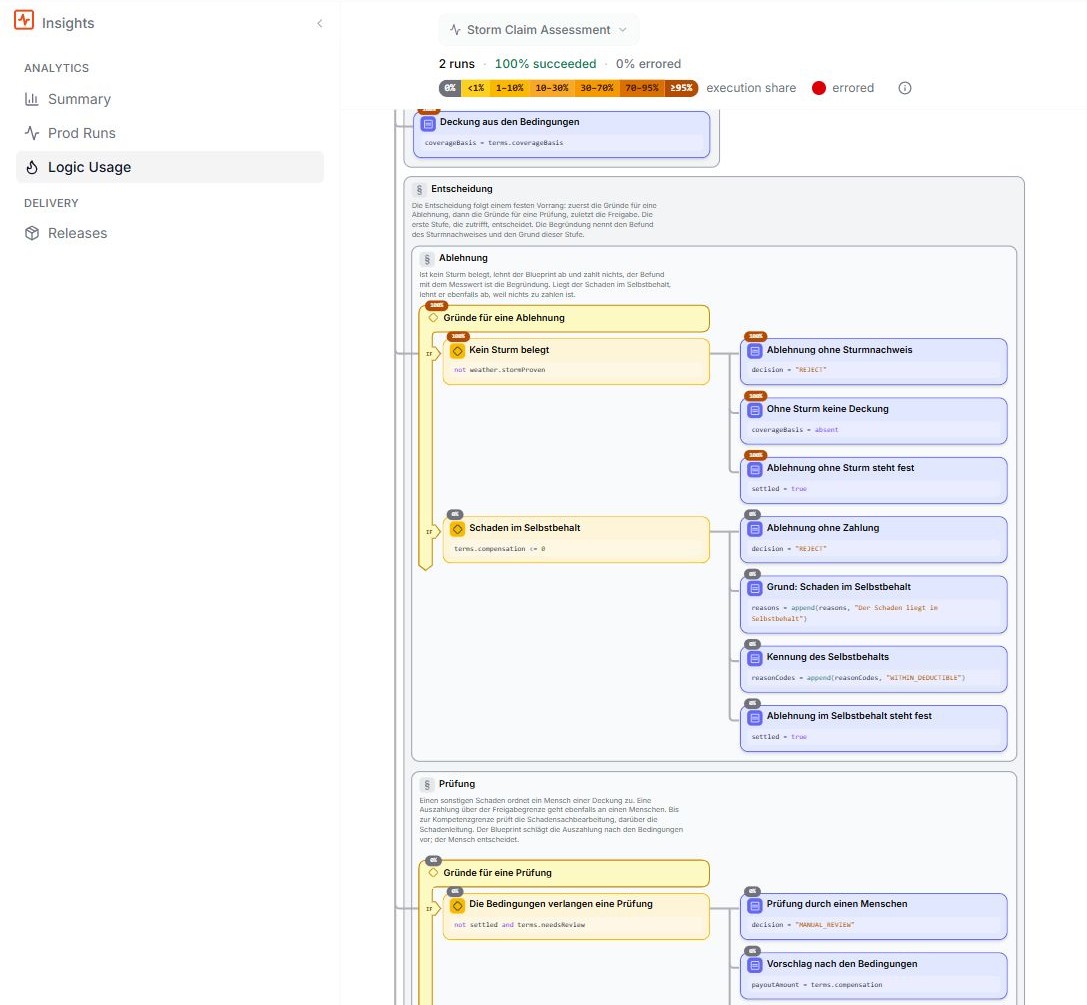
The Logic Usage heatmap provides a broader perspective. It shows which parts of the Blueprint production runs reach and how frequently. In this claims example, the team could examine a frequently used referral branch or investigate conditions that are rarely reached. Observed usage gives experts a concrete basis for deciding what deserves closer review.
Use real cases to strengthen the assessment
An unexpected production case can become a useful addition to the team's test coverage. Leapter allows a production run to be captured as a test case; the specialist can review the expected outcome against the policy before using it to validate future changes.
That creates a connected way of working. A live assessment prompts an investigation. The team inspects the relevant logic, confirms the intended behavior, adds a representative test, and validates any proposed correction before release.
The Playground remains useful throughout this work. Stakeholders can try the revised assessment through its interface, while the team checks the underlying conditions and calculations. After release, Insights provides visibility into how the updated logic is used.
What Leapter brings to this use case
- AI-assisted authoring: Create and refine claims logic with an agent, using business rules and policy context as the starting point.
- Readable, executable Blueprints: Review business explanations alongside the conditions and calculations that actually run.
- Playground UI creation: Build an interactive claims interface for entering examples and displaying assessment results.
- Scenario testing and traces: Explore boundary cases, compare expected outcomes, and follow the logic behind a result.
- Deterministic execution: Run defined rules consistently for the same complete inputs and logic version.
- Versioned releases: Identify the implementation used for a production assessment and manage subsequent changes.
- Production visibility through Insights: Inspect individual runs, their inputs and outputs, and their recorded execution paths.
- Logic Usage heatmaps: See which decision paths are used most often and focus review efforts on relevant parts of the assessment.
Together, these capabilities give the claims team a continuous connection between policy intent, executable behavior, and operational evidence. Experts can help shape the assessment, experience it through a working interface, and investigate how it behaves after release.
Bring one claims assessment to Leapter. Explore how its policy conditions, calculations, and review criteria can become an application your experts can understand, test, and improve. Discuss your use case with Leapter.