
What a ChatGPT plugin is, what we shipped, and the test page our coding agents used to check their own work.
In October we brought Leapter into ChatGPT. You describe a business rule in the chat, ChatGPT writes it as a Blueprint, and Leapter shows it in the conversation as a diagram you can run and change.
Coding agents wrote all of the code, several of them in parallel, each on its own small task. We anticipated one challenge. When an agent builds something for another application, it needs to test its work there. But that access is not always available.
Our agents could reach ChatGPT, but when they tested their code there on their own, ChatGPT rate-limited our account. Development stopped until we built our own test environment.
A ChatGPT plugin in plain words
ChatGPT can call services outside of OpenAI while it writes an answer. A plugin is the package that introduces one such service to ChatGPT: a name, a short description, an icon, and the web address of a server that ChatGPT may call. OpenAI first called these packages “apps” and renamed them plugins in 2026.
The server offers tools. A tool is one action the service can take, like “create a project” or “run this Blueprint”, together with a description in plain text. ChatGPT reads the descriptions and decides when to call which tool. The tools work in the background. You see ChatGPT’s answer and the results it built the answer from.
ChatGPT and the server talk over MCP, the Model Context Protocol. MCP is an open standard for connecting AI assistants to outside tools and data. Most AI assistants and coding tools support it, so the same server can serve other assistants as well.
A plugin can also bring its own screen. Next to the text, ChatGPT can show a small web page from the plugin inside the conversation. ChatGPT loads that page in a sealed frame, so the page cannot read your chat or anything else on your screen. We call ours the card.
Put together, a plugin has two halves. The tools define what ChatGPT can ask Leapter to do. The card defines what you see.
What we shipped
You add Leapter from ChatGPT’s plugin list.
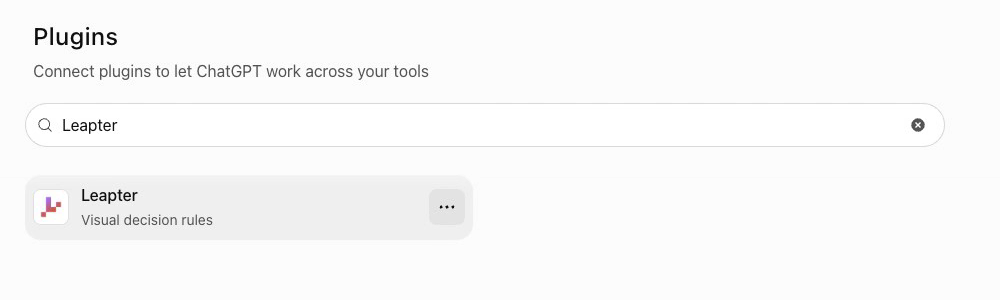
In the example below, a user attaches a discount policy as a PDF and asks Leapter to turn it into a Blueprint. ChatGPT first asks Leapter for a guide to Leapter’s rule language. Then it writes the Blueprint and sends it to Leapter step by step.
Leapter checks everything it receives. If it finds an error, it tells ChatGPT what is wrong, and ChatGPT can fix it and try again. Once the project is complete, the card appears.
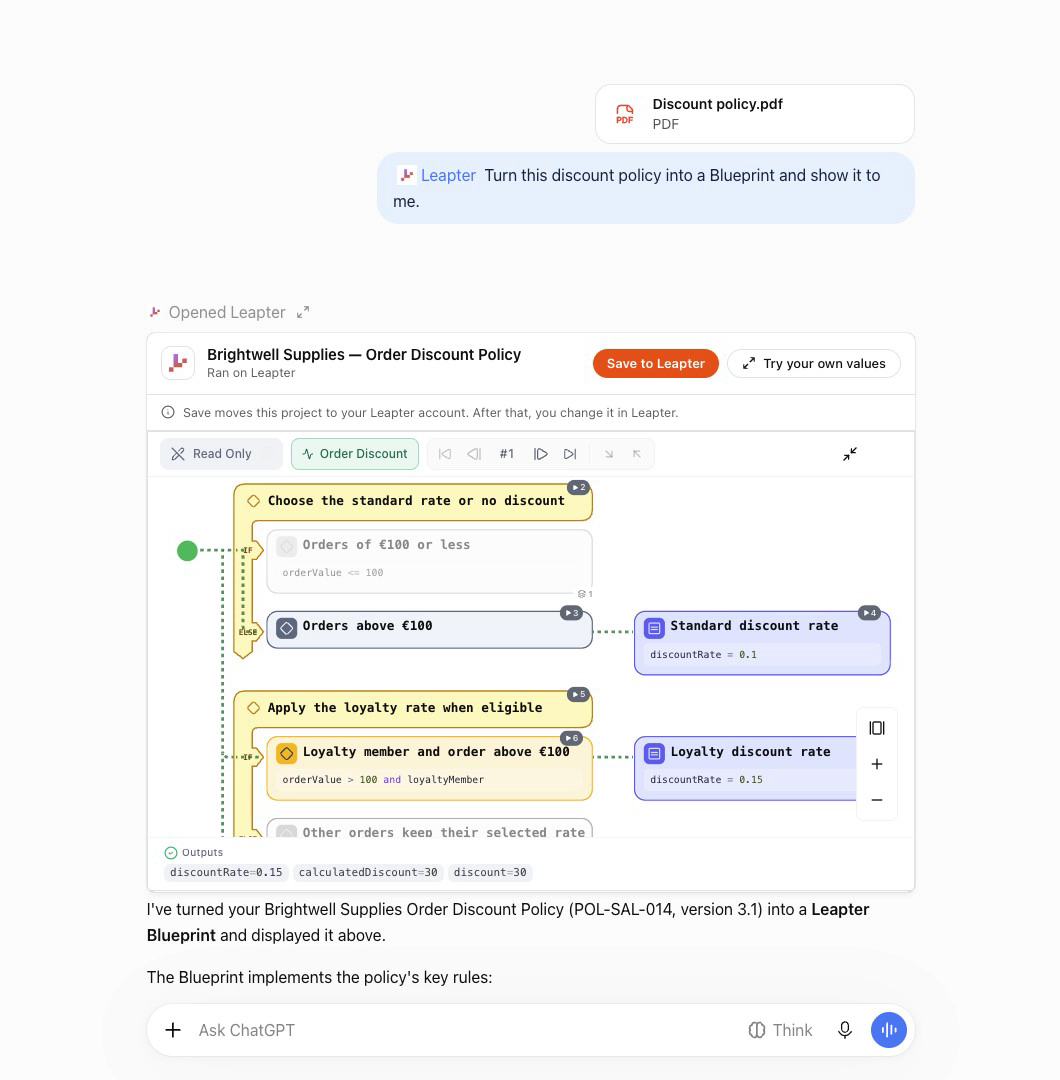
The card draws the rules as a flow. Each condition, calculation and outcome has a short title that a business expert can read, with the exact formula below it. In this example the card opens with a run, and the results sit under the diagram.
“Try your own values” opens the card in fullscreen. You change the order value or the loyalty status in the sidebar, and the Blueprint runs again in your browser. The diagram marks the path the run took.
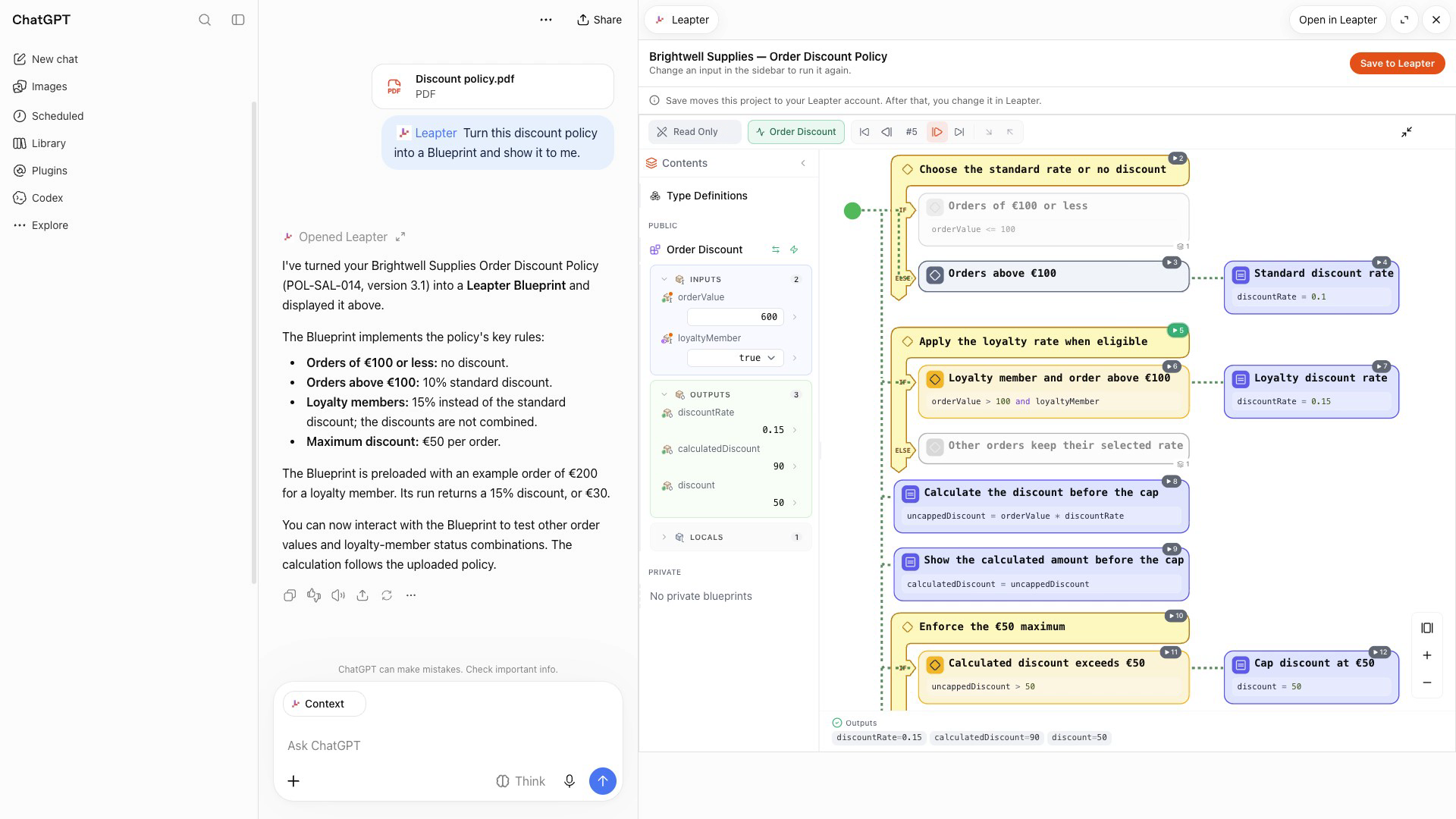
You can also ask in the chat: “How much discount does a 600 euro order from a loyalty member get?” ChatGPT hands the question to Leapter. Leapter runs the Blueprint, and ChatGPT reports the result: 50 euros.
The loyalty rate of 15 percent gives 90 euros, and the policy caps every discount at 50. The number comes from the same logic you see in the card, and the same input gives the same number every time.
“Save to Leapter” moves the project into your Leapter account. You sign up or sign in, and the project opens in Leapter Lab. There you refine the rules, test scenarios and exceptions, and trace the steps behind a result.
The deliverable
The plugin package submitted to OpenAI is a ZIP file smaller than 100 KB. Everything else runs on our servers. The delivery has three parts:
| Part | What it is |
|---|---|
| The server | One address, lab.leapter.com/api/mcp, with 13 tools. |
| The card | A small web page. It loads the Blueprint viewer that also shows Blueprints on our website, and Leapter’s rule engine, compiled to run in the browser. |
| The package | The listing (name, descriptions, three starter prompts, icons), the server address, and eight test cases for OpenAI’s reviewers. Five cases describe what the plugin must do. Three describe what it must refuse, for example a request to open another user’s project. |
The problem: testing inside ChatGPT
We cut the project into small issues, each one sized for a single agent session. Each agent worked in its own copy of the code and opened its own pull request, 42 in total. One developer made the decisions, reviewed the work and tested the result in ChatGPT at the end.
An agent that writes code needs a way to see what the code does. For the server, tests did that job: they call the tools and compare the answers. The card was harder.
The card comes alive inside a host that loads it, hands it the tool result and answers its requests. Outside ChatGPT, the card is an empty page that waits for messages.
To test one change in real ChatGPT, you have to:
- Open a public tunnel from the internet to your laptop.
- Start the app with the tunnel’s address.
- Sign in to ChatGPT.
- Register a custom MCP server in ChatGPT’s plugins.
- Type a prompt, and wait for the model to call the right tools.
Each round takes minutes, and no two rounds look alike, because the model writes a different Blueprint each time. At first our agents ran these rounds on their own. With several agents testing in parallel, ChatGPT rate-limited our account, and development stopped until we had another way to test.
Unit tests that fake ChatGPT could not fill the gap. Those tests cannot tell you whether the diagram renders, how tall the card gets, how it looks on ChatGPT’s dark background or whether the fullscreen button works.
Without a real host, these bugs would only have surfaced during the final manual test, after dozens of pull requests had accumulated.
The answer came from a design session. There we had used a rough, hand-written host page to try the card, and it caught a mismatch between our card and the protocol version ChatGPT speaks. An agent turned that rough page into a proper tool in our code base.
The testbed
The testbed is a page in our app that exists only during development. The page plays ChatGPT’s role:
- It calls the same server ChatGPT would call, on the developer’s laptop.
- It loads the card in a frame from a second local address. ChatGPT also serves every card from a domain of its own, so the browser treats the card the same way in both places.
- It talks to the card through the host side of the MCP Apps standard, the protocol ChatGPT speaks.
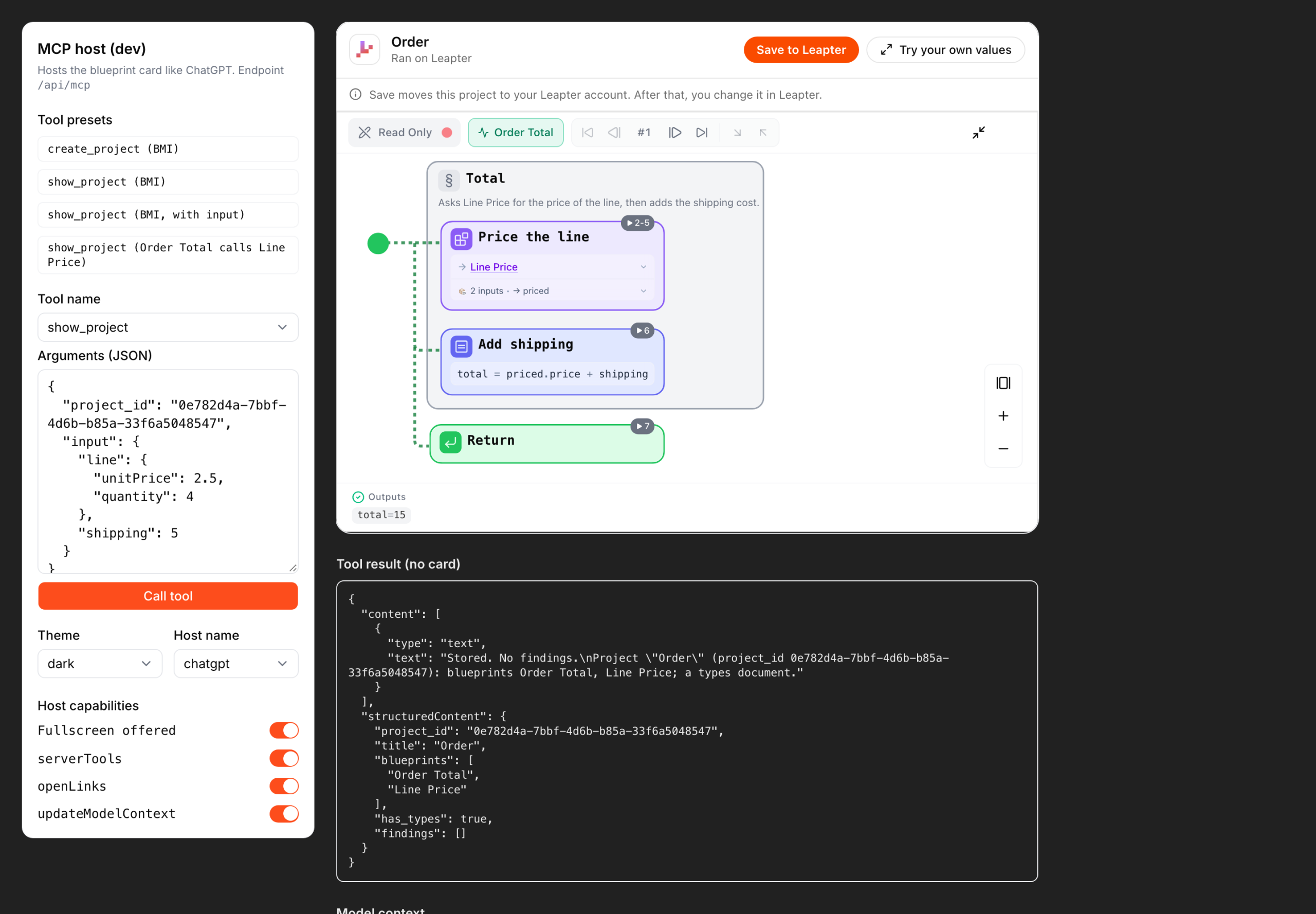
On the left sit the controls. Preset buttons make real tool calls: store a BMI calculator, show it, show it with an input, or show a project in which an order total calls a separate Blueprint for the line price.
You can switch to ChatGPT’s dark background, pretend to be ChatGPT, Claude or an unknown host, and turn off features a host may not offer, such as fullscreen or opening links.
Below the card, the page shows the raw tool result, the note the card leaves for the model, and a log of every message between host and card.
The card’s own buttons work too. “Try your own values” switches the frame to fullscreen, as it does in ChatGPT.
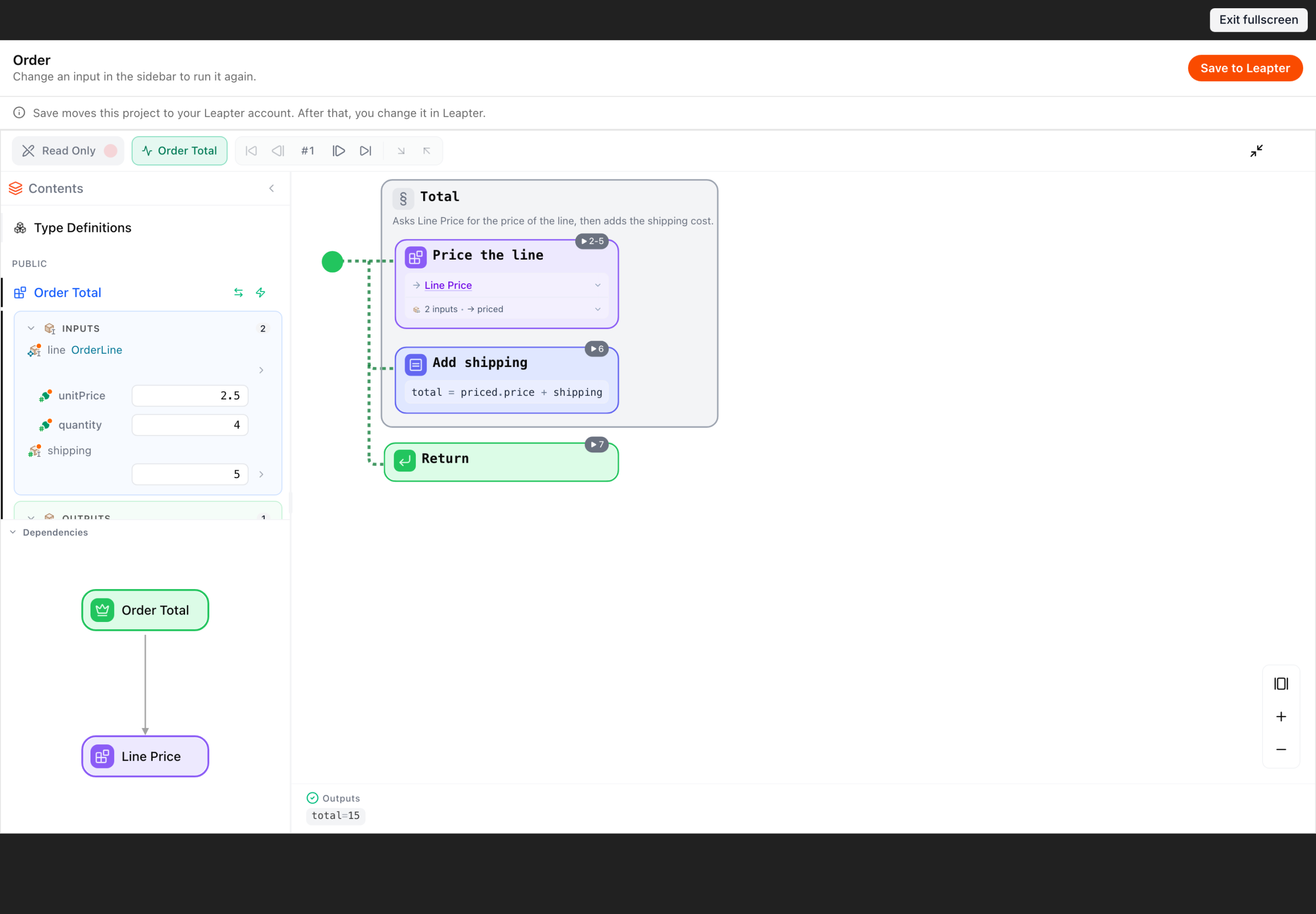
Each control can also be set through a URL parameter, for example /dev/mcp-host?preset=show_project_helper&theme=dark. An agent opens that address in a headless browser, clicks through the card and takes screenshots.
The agents attached those screenshots to their pull requests and recorded short videos for review. A reviewer could see each change without starting anything.
An example: dark mode
ChatGPT has a dark mode, and our first card did not handle it. On ChatGPT’s dark background, the text in the diagram came out dark on dark, and some buttons were almost invisible.
We decided that the card always stays light, even when ChatGPT is in dark mode. The agent that made the change switched the testbed to ChatGPT’s dark background, checked the card in seconds and attached a screenshot to its pull request. Nobody had to open ChatGPT for that check.
ChatGPT still gets the final check
The testbed copies ChatGPT closely, but not in every detail, so some bugs only showed up in ChatGPT itself.
One example: ChatGPT draws its own border around the card, and in fullscreen its own title bar with our icon and a close button. Our card drew a border and a title bar too, so in ChatGPT the card showed both twice. We fixed the card and updated the testbed to match.
We settled into a routine of two steps. Changes to the card go through the testbed first, where a check takes seconds and gives the same result each time. Before a release, a person opens ChatGPT and walks through the review test cases by hand.
If agents write your code, give them a way to look at what they built. For us that took one afternoon, and we have used the testbed for card changes ever since.
Try it
Open ChatGPT, add Leapter from the plugins, and ask: “Create decision logic for credit risk scoring.”
Open the card in fullscreen, change the inputs, and follow the path through the diagram. If you like the result, save it to Leapter.